A storefront built on a REST API — tested first, then designed around what
the tests found, documented for the developers who build on it, and delivered as an interactive prototype.
A shopper never sees an API — they see what the store does with it. When a REST API answers “200 OK” for a
product that doesn't exist, or returns the oldest products when asked for the newest, the storefront is what
looks broken. Harbor & Co. starts from a tested API and designs the store around the way it actually
behaves.
RoleQA tester · UX/UI designer · Technical writer
Who it's forShoppers browsing and buying · Front-end developers
building on the API · QA and support checking what “normal” looks like
The prototype runs on local data that answers the way the API
answered during testing — the same status codes, the same response fields, and writes that aren't stored — and
it reproduces every defect below as observed.
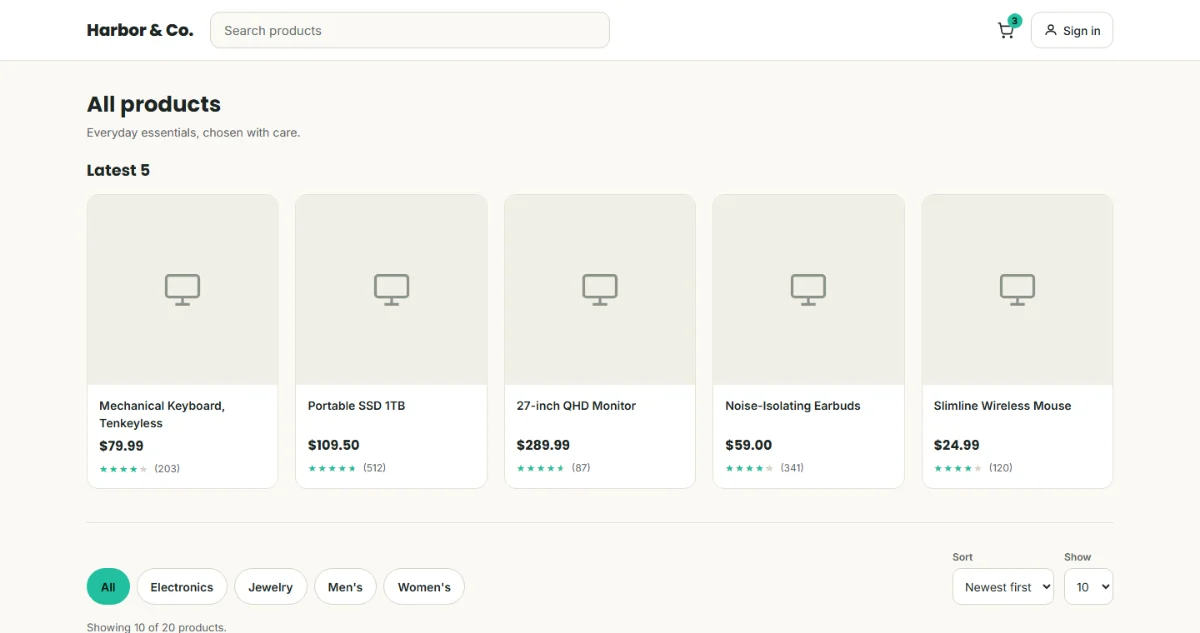
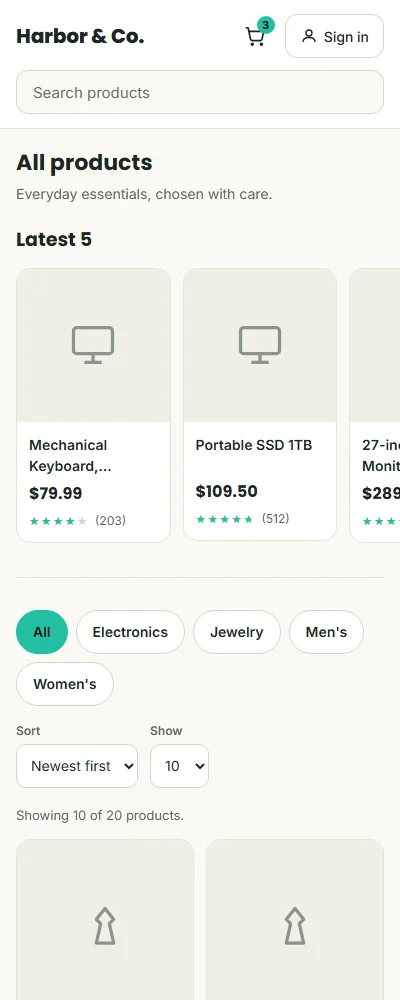
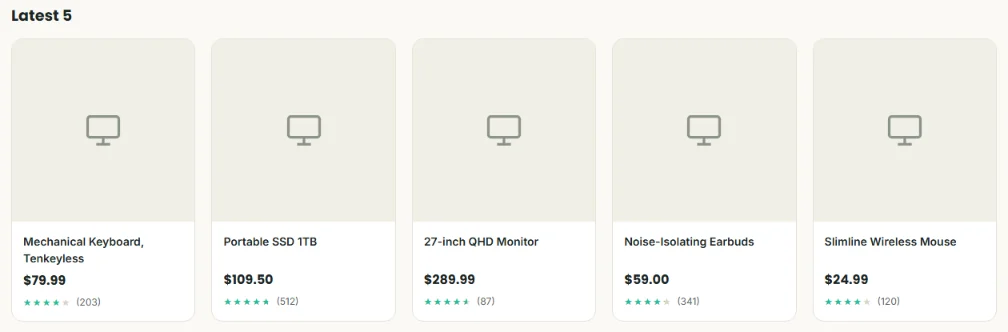
The catalog. The “Latest 5” shelf shows the oldest five products — that's BUG009, left visible on
purpose.
How the project came together
1
API testing QA
A 17-request Postman collection built on black-box techniques. Two defects confirmed live with curl
before they were written up.
2
Design UX/UIQA
A storefront whose requirements came from the test results. The design mock was reviewed for defects
and accessibility before the build.
3
Documentation Technical Writing
An API reference written from live requests. Writing it surfaced a third defect the collection had
missed.
4
Build & test UX/UIQA
An interactive prototype tested against 26 cases, with an API inspector that shows every request a
screen makes. Try it.
17
API requests in the Postman collection
3
API defects confirmed live, plus 1 security observation
11
Storefront defects found and fixed, 7 of them before build
26
Test cases run against the prototype
UX/UI
Designing around a real API
From test results to a design brief
Most design briefs start from what the product should do. This one started from what the API actually does.
Every behavior the tests confirmed became a requirement for the store — before a single screen was drawn.
What the API does
What a shopper would see
Design requirement
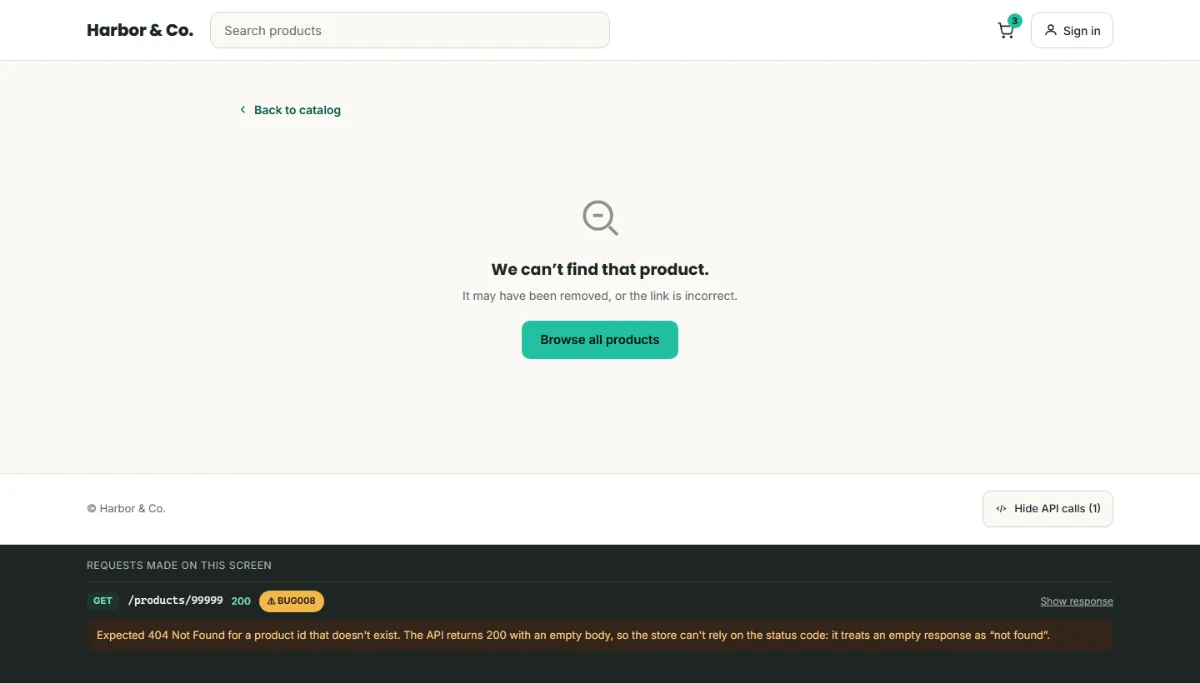
A missing product returns 200 with an empty body
A blank or half-drawn page that looks like the store is broken
Check the body, not the status code. Show “We can't find that product” with a way back.
sort and limit together return the wrong products
“Newest first” showing the oldest items
Sort and limit in the browser. Leave one shelf on the raw response so the defect stays visible.
Writes are answered but never stored
A cart that forgets every change as soon as it's loaded again
Read the cart once. After that, the browser's copy is the source of truth.
An unknown category returns 200 with an empty list
“No products” for a mistyped link, as if the shelf were just empty
Compare against the category list, and tell “unknown” apart from “empty”.
A failed sign-in answers in plain text, not JSON
A form that freezes, or a raw error string
Check the status first; show a plain-language message and move focus to it.
The user endpoint includes the password in plain text
Nothing — unless the store prints it
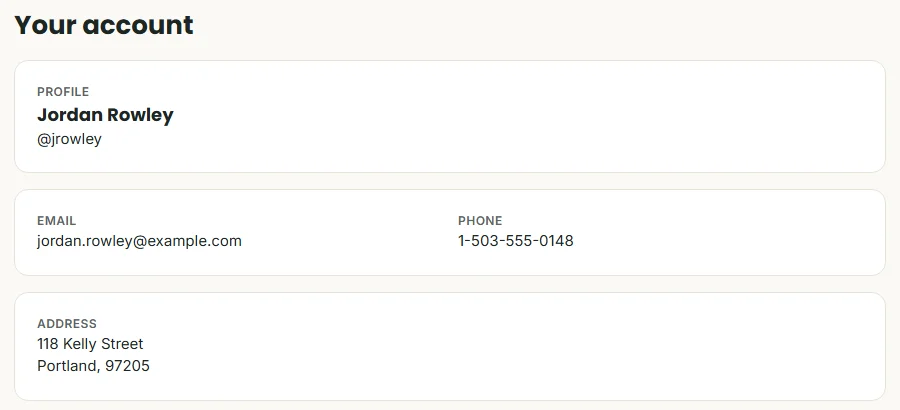
The account screen shows profile fields only. The password is never rendered.
No shopper research was run for this project. The requirements come from the API's
tested behavior, and each one is covered by a test case in the QA section.
Screens
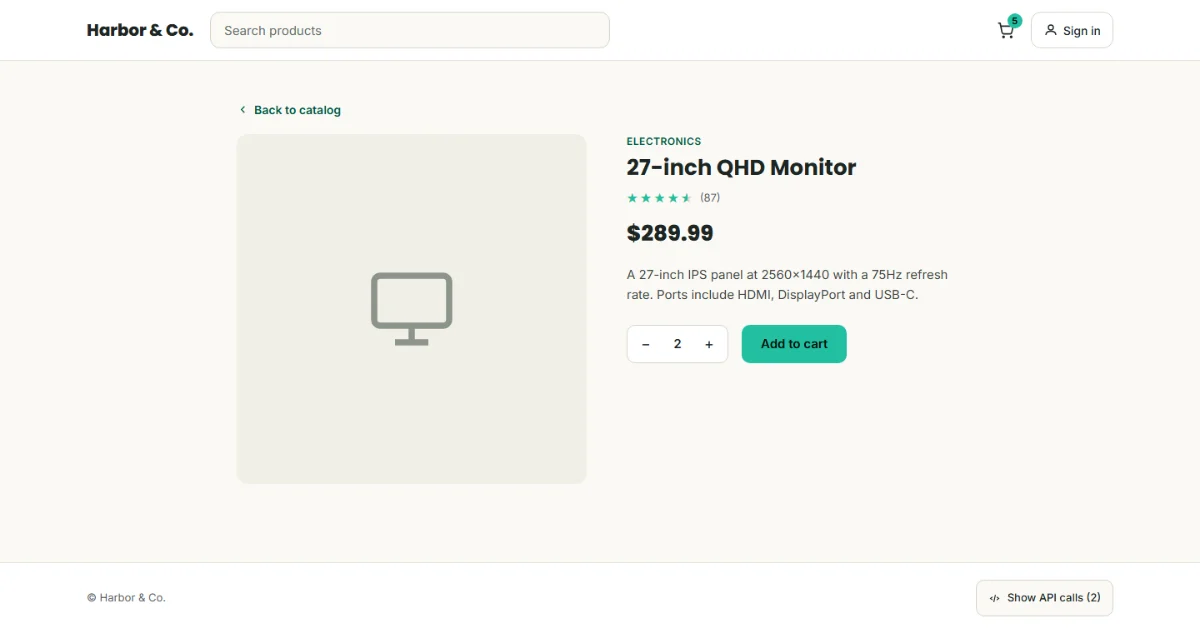
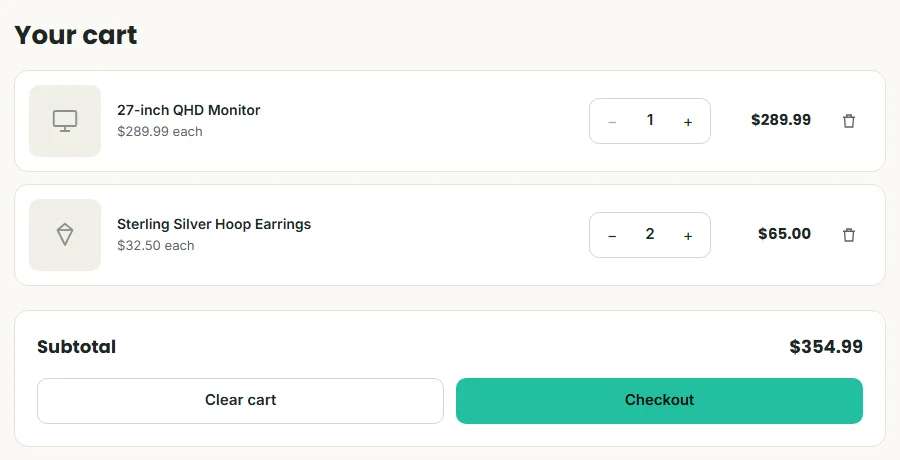
Six screens — sign in, catalog, product, cart, order summary and account — with loading, empty, error and
ready states wherever the screen can reach them.
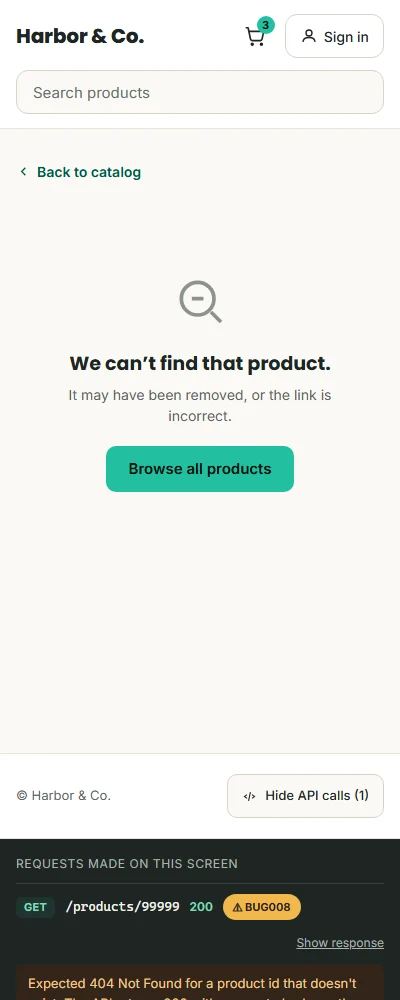
Product page. The cart badge updates as soon as the API confirms the change.A product that doesn't exist. The API says 200; the store reads the empty body and says what
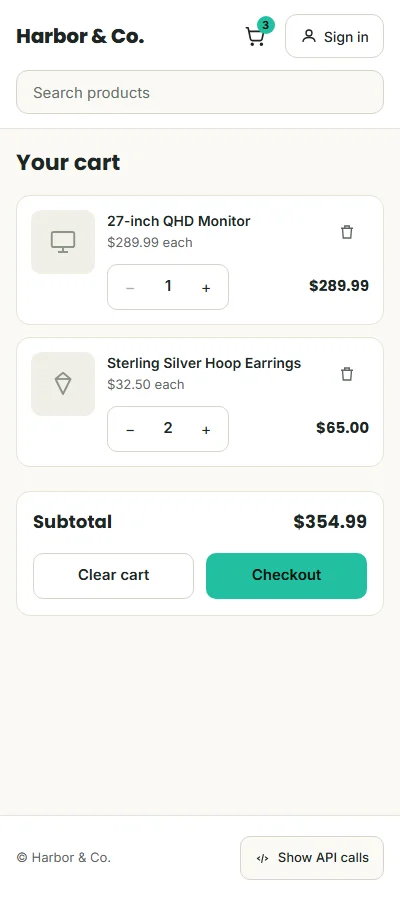
happened. The API inspector, opened from the footer, shows why.Cart. Every change is sent to the API; the browser keeps the result.
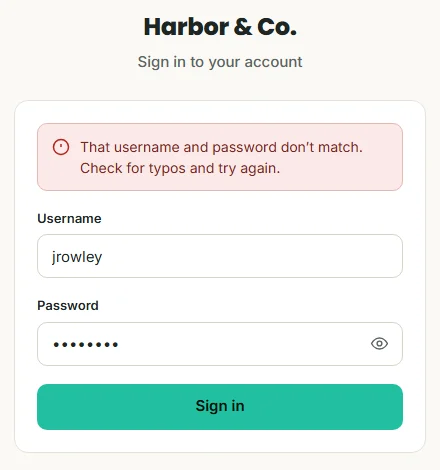
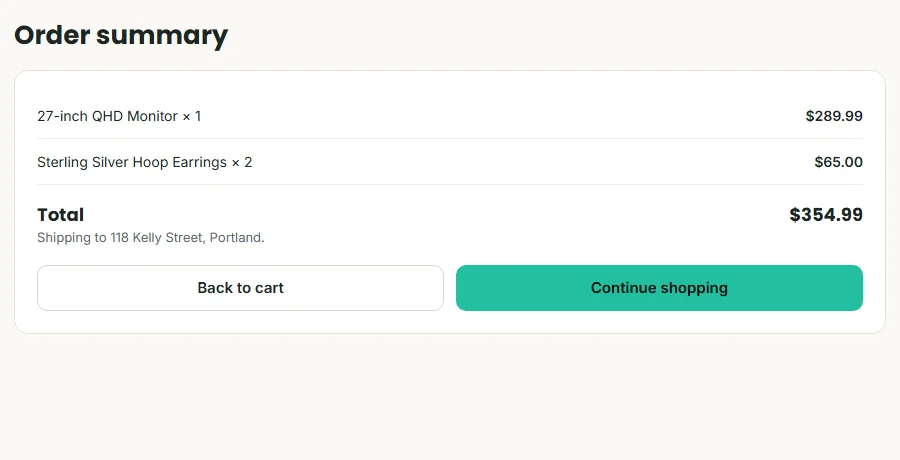
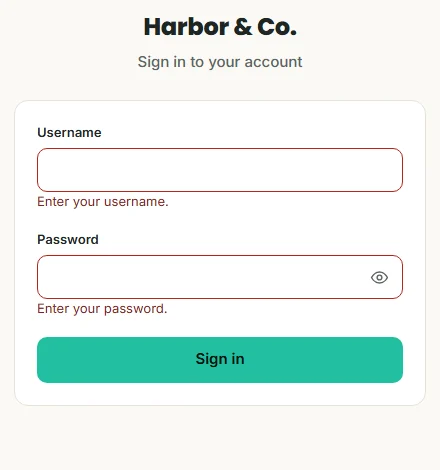
Sign in, after a 401.Order summary — only after signing in.
The same screens at 400 px — the catalog shelf becomes a swipeable row, and cart lines stack their
controls.
Design decisions
1
Trust the body, not the status code
This API says 200 for things that don't exist, so “not found” is decided by what came back, not by
the number. A shopper gets a clear message instead of a blank page.
2
Sort and limit where they work
The grid asks for the products once and sorts and limits them in the browser, so “Newest first” is
always true. Only the “Latest 5” shelf uses the broken combination — on purpose, so the defect can be
seen in context.
3
The browser owns the cart
The API answers every write and stores none of them. The cart is read once; after that, each change
is sent and the response becomes the new cart. Reading it again would quietly undo the shopper's work.
4
An unknown link isn't an empty shelf
A category the store doesn't carry gets its own message, not “No products yet” — the fix for a wrong
link is different from the fix for an empty category.
5
Every screen accounts for its states
Loading skeletons, empty states, errors with a “Try again”, and the ready state — wherever a screen
can reach them. The store never shows a screen that looks finished when it isn't.
6
Sign in only when it matters
Browsing and the cart are open to everyone. The account and checkout ask for sign-in, then return the
shopper to exactly where they were going.
7
The evidence lives in the product
A footer toggle opens an API inspector: every request the screen made, its status and its response,
with known defects flagged and explained. It's how a developer or tester sees the API behind the
design.
8
Accessible by default
Every text and control meets WCAG AA contrast, every control is at least 44 × 44 px, and every label
is visible — measured, not assumed.
Validation
The design wasn't tested with shoppers. It was validated two other ways: every status code and response it
depends on was checked with live requests to the API, and the prototype passed 26 test cases, including an
offline state and a target-size check.
The developers building on this API need two things from its documentation: what a normal response looks
like, and what to do when it isn't normal. The reference covers both — including the defects, written as known
issues with workarounds.
The samples below are excerpts. Each one opens with a short note on who it's for and why it's written the way
it is.
Documentation plan
Audiences
Audience
What they need from the docs
Front-end developer
Exact requests and responses to build against, the status codes to expect, and how to work around
what's broken.
QA and support
What a correct response looks like, so a real problem can be told apart from a known issue.
Nothing here was copied from a description of how the API should work. Every status code, response body and
error message was sent live and copied from the actual response. That's also how the reference found a
defect the test collection had missed: documenting GET /carts/{id} meant trying an id that
doesn't exist.
Sample 1 · One task, two languages
Audience
Front-end developer
Type
Task
Why it's written this way
Developers copy examples before they read prose, so the example has to work as pasted. The topic is
single-sourced: one set of steps, with the code and the language-specific warning shown for the reader's
language. It also warns about the one thing that breaks naive code — errors come back as plain text.
Show examples in
API Reference › Authentication
Sign in and get a token
Send a username and password to /auth/login. If they match, the API returns a token for the
session. Replace {base_url} with the API's address.
Send a POST request with the username and password as JSON.
Add -i to see the status line. A successful sign-in returns
HTTP/1.1 201 Created.
JavaScript
if (res.status !== 201) {
  const message = await res.text(); // errors are plain text, not JSON
  throw new Error(message);
}
const { token } = await res.json();
Important Calling res.json() on a failed sign-in throws a parse
error, because the error body is plain text. Read errors with res.text().
Keep the token for the session. The other endpoints in this reference were tested without it.
Responses
Status
When
Body
201 Created
The username and password match.
{"token": "eyJhbGciOiJIUzI1NiIs…"}
400 Bad Request
The username or password is missing.
Plain text: username and password are not provided in JSON format
401 Unauthorized
The username and password don't match.
Plain text: username or password is incorrect
Sample 2 · Reference: Products
Audience
Front-end developer · QA
Type
Reference
Why it's written this way
References are scanned, not read: one endpoint per block, parameters in a table, a real response, then
the exceptions. Known issues sit right under the endpoint they affect — a developer shouldn't have to find
a separate page to learn that an endpoint lies.
API Reference › Products
Products
Read the catalog: every product, one product, the category list, and the products in a category.
GET/products
Returns every product, in ascending id order unless you sort them.
Query parameter
Type
Description
limit
integer
Optional. Returns only the first n products.
sort
string
Optional. desc returns the highest ids — the newest products — first.
Known issue Don't combine sort and limit.
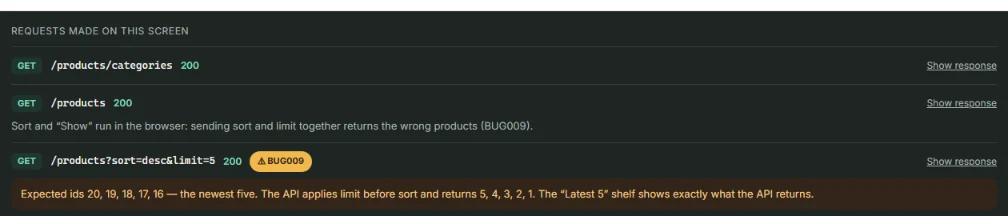
?sort=desc&limit=5 returns ids 5, 4, 3, 2, 1 instead of 20, 19, 18, 17, 16: the limit is
applied first. Request ?sort=desc and keep the first five in your code. See BUG009.
Response · 200 OK (one item shown)
[
  {
    "id": 3,
    "title": "27-inch QHD Monitor",
    "price": 289.99,
    "description": "A 27-inch IPS panel at 2560x1440 with a 75Hz refresh rate. …",
    "category": "electronics",
    "image": "https://cdn.harborandco.example/products/3.jpg",
    "rating": { "rate": 4.5, "count": 87 }
  }
]
Product fields
Field
Type
Description
id
integer
Unique product id.
title
string
Product name, as shown to shoppers.
price
number
Price in US dollars. Can have no decimals — format it before you display it.
description
string
Plain-text description.
category
string
One of the values from /products/categories.
image
string
URL of the product image.
rating
object
rate — average from 0 to 5. count — number of reviews.
GET/products/{id}
Returns one product object, with the fields above.
Known issue An id that doesn't exist returns 200 OK with an empty body, not
404. Treat an empty body as “not found”. See BUG008.
GET/products/categories
Returns the category names as an array of strings:
["electronics", "jewelery", "men's clothing", "women's clothing"].
Note The API spells one category jewelery. Send it exactly as returned;
display it however you like.
GET/products/category/{category}
Returns the products in one category. URL-encode the name: men's clothing becomes
men's%20clothing.
Tip A category that doesn't exist returns 200 OK with [] — the
same answer as an empty category. To tell them apart, check the name against
/products/categories first.
POST/products
Returns 201 Created and the product you sent, with a new id. The product isn't
stored: it won't appear in later reads.
Sample 3 · A task that depends on a surprise
Audience
Front-end developer
Type
Task · reference
Why it's written this way
The most important sentence in this topic isn't a step — it's that nothing you write is stored. It goes
before the steps, because a developer who learns it after building the cart has to rebuild it. The steps
then describe the pattern that works.
API Reference › Carts
Keep a shopper's cart
Load a cart, change it, and empty it.
Before you start The API answers every write but stores none of them. After a
PUT or DELETE, the next GET returns the original cart. Keep the
cart in your app, and use each write's response as the new cart.
When the store loads, read the cart once.
GET {base_url}/carts/1
To add, change or remove a product, send the wholeproducts array with
PUT. The response echoes the cart you sent — keep it.
If the shopper has no cart, create one with POST /carts and the same body. The response is
201 Created with a new id.
To empty the cart, send DELETE /carts/{id}. The response is the cart as the API had it
stored.
Endpoints
Request
Success
Returns
GET/carts
200 OK
Every cart.
GET/carts/{id}
200 OK
One cart. An id that doesn't exist returns null — see BUG010.
POST/carts
201 Created
The cart you sent, with a new id.
PUT/carts/{id}
200 OK
The cart you sent.
DELETE/carts/{id}
200 OK
The stored cart.
Cart body
Field
Type
Description
userId
integer
The shopper the cart belongs to.
date
string
Date of the change, YYYY-MM-DD.
products
array
Every line in the cart: productId (integer) and quantity (integer).
__v
integer
Returned on stored carts. An internal version number — ignore it.
Sample 4 · Troubleshooting
Audience
Front-end developer · QA
Type
Troubleshooting
Why it's written this way
Each problem is titled the way a developer notices it — “the request succeeds but…” — not by its defect
number, so it matches what they search for. Every entry says why it happens and what to do today, and the
defect ID links back to the report.
API Reference › Troubleshooting
Known issues
A product request succeeds, but there's no product
Why it happens: The id doesn't exist. The API returns 200 OK with an empty
body instead of 404 (BUG008).
What to do: Check that the body isn't empty before you use it, and show a “not found”
state when it is.
Asking for the newest five returns the oldest five
Why it happens: With sort and limit together, the API limits
first and sorts second (BUG009).
What to do: Send sort only, and apply the limit in your code.
A cart request succeeds and returns null
Why it happens: The cart id doesn't exist. The API returns 200 OK with
null (BUG010) — a different shape from the empty body a missing product
returns.
What to do: Treat both an empty body and null as “not found”.
My cart changes disappear when I load the cart again
Why it happens: Writes aren't stored, so GET always returns the original
cart.
Why it happens:400 and 401 responses are plain text, not
JSON.
What to do: Check the status first, and read error bodies with res.text().
See Sign in and get a token.
The user response includes a password
Why it happens:GET /users/{id} returns the password field in
plain text (security observation).
Important Never display, log or store this field. Read only the fields your screen
needs.
UX writing: before and after
The words in the design mock were reviewed with the same care as the reference. Each change below is one
less thing a shopper has to figure out.
Where
Design mock
Final
Why
Sign in, empty fields
That username and password don't match. Check for typos and try again.
Enter your username. · Enter your password.
Nothing was checked yet. The message has to match what actually happened.
Product not found
Back to catalog — twice, as a link and a button
Back to catalog · Browse all products
Two controls with one name make people wonder how they differ.
Catalog heading
(none — the page opened on “Latest 5”)
All products · or the category name
Says where you are, and gives the page a real title for screen readers.
Show control
Show 5 · Show 10 · Show all, label hidden
Show: 5 · 10 · All
A visible label, said once, instead of repeated inside every option.
Order summary
We'll use this list to prepare your order.
Shipping to 118 Kelly Street, Portland.
The first promised something the store doesn't do. The second is true and useful.
Cart changes
(no message)
Item removed · Cart cleared
Every change confirms itself, and screen readers announce it.
API inspector
88 ms · 132 ms
(removed)
Those times were never measured. A number on screen has to be true.
How the error messages are written
Say what to do next — “Check your connection and try again.”, not “Network error.”
Match what happened — a missing field and a wrong password get different messages.
No blame, no codes — the status code belongs in the inspector, not in front of a
shopper.
Move focus to the message, and give every recoverable error a “Try again”.
Style conventions
The samples follow the Microsoft Writing Style Guide, plus a few rules that matter in API documentation:
Every example is a real request or response from testing, never an idealized one.
Endpoints, parameters, fields and values in code font; placeholders in braces, like
{base_url}.
Status codes with their number and name — 201 Created, not just “success”.
Known issues next to the endpoint they affect, labeled and linked to the defect report.
Second person, present tense, active voice; sentence-case headings.
QA
Two systems, tested
Harbor & Co. was tested in two layers. The API was tested with a Postman collection and confirmed with
curl. The storefront was reviewed as a design mock, audited for accessibility, and tested as a working
prototype against 26 cases.
The API's defects belong to the API — they're documented with workarounds, not fixed. The storefront's
defects are in the project's own work — the design mock and the prototype's code — and each one is fixed and
retested.
Test plan
Objective
Confirm how the API behaves — including where it's wrong — and make sure the store never shows a shopper
wrong data as if it were right, never loses their cart, and never exposes private data.
Scope
In scope
API: auth, products, categories, carts and users
Store: catalog, search, sort and show, product page, cart, checkout summary, sign in and account
Loading, empty, error and offline states
Accessibility of every store screen, at 1440 and 400 px
Out of scope
Payments and orders — the API has no endpoint for them
Performance and load
Full user management
Browsers other than Chrome
Approach
Pass
What was reviewed
How
1 · API testing
The REST API
17 Postman requests with pm.test assertions: equivalence partitioning, boundary
values and parameter interaction. Every finding confirmed with curl.
2 · Design review
The storefront design mock
Review against the design brief and the API's real behavior; copy and consistency checks
3 · Reference verification
Every documented behavior
Live requests for each status code and response in the API reference
4 · Accessibility audit
The mock and the prototype
Contrast measured with the WCAG 2.1 formula, axe-core on 11 states, target size, keyboard and
focus
5 · Functional testing
The interactive prototype
26 test cases: state transitions, equivalence partitioning, boundary values, negative, role-based
and offline tests
Environment: Postman and curl for the API · Chrome (latest), Windows 11, 1440 × 900 and
400 px for the store · axe-core 4.10.
Risks, in priority order
Risk
Why it matters
Covered by
High The store shows wrong data as if it were right
A missing product or the wrong “newest” items look like a working store
TC01, TC02, TC04, TC11
High The cart loses changes or disagrees with the API
A cart that forgets is the fastest way to lose a sale
TC10, TC12, TC14, TC21, TC22
High Private data is shown to the wrong person
The API sends a password; the account must not show it, or show anything without sign-in
TC15, TC18, TC19, TC23
Medium A screen can't be used with a keyboard, touch or
low vision
Accessibility is a requirement, not a feature
Contrast audit, axe-core, TC13, TC20, TC26
Low Errors and empty states leave the shopper stuck
Friction, not data loss
TC06, TC07, TC16, TC17, TC25
Exit criteria
Every High-risk case passes, no High-severity storefront defect stays open, every API defect has a
documented workaround, and axe-core reports zero violations. All four were met.
The API test collection
Structure of the Postman collection. Folders follow the API's resources.
Each request was built around a black-box technique instead of poking at the API at random:
Equivalence partitioning — valid against invalid credentials, valid against invalid
category: one representative request per class.
Boundary value analysis — a product id at the edge of the valid range (1–20) against
one clearly outside it (99999). This found BUG008.
Parameter interaction — sort and limit each tested alone,
then together. The combination is what broke: BUG009.
API defects — 3 confirmed, plus 1 security observation
Each was confirmed live with curl before it was written up. They're open in the API and
documented with a workaround in the known issues.
BUG008 · [Products] GET /products/:id with a non-existent id returns 200
instead of 404
Found in: API testing · boundary value analysis
Severity: MediumPriority: MediumOpen · workaround in the
store
Send GET /products/99999, an id outside the valid range of 1–20.
ExpectedHTTP 404 Not Found with a message saying the product doesn't exist.
ActualHTTP 200 OK with an empty body. A client that checks for 404 reads it as a
successful, empty response.
Workaround: The store checks the body, not the status code, and shows “We
can't find that product” — see the Products reference. Verified by TC11.
BUG009 · [Products] GET /products applies limit before sort, breaking
sort=desc&limit=N
Found in: API testing · parameter interaction
Severity: MediumPriority: MediumOpen · workaround in the
store
Send GET /products?sort=desc alone and confirm it returns ids in descending order (20, 19,
18…).
Send GET /products?sort=desc&limit=5 and compare.
ExpectedIds 20, 19, 18, 17, 16 — the newest five products.
ActualIds 5, 4, 3, 2, 1 — the first five in ascending order, reversed. The limit is
applied before the sort.
Neither parameter fails alone. The defect only appears when they're combined — which is why
parameter interaction testing found it.
In the storeAPI inspector
Workaround: The product grid requests the list once and sorts and limits
it in the browser (TC01, TC04). The “Latest 5” shelf keeps the raw response so the defect stays visible
(TC02, TC24).
BUG010 · [Carts] GET /carts/:id with a non-existent id returns 200 with
null
Found in: writing the API reference · confirmed with curl · not covered by the original
collection
Severity: MediumPriority: LowOpen · documented
Send GET /carts/999, an id that doesn't exist.
ExpectedHTTP 404 Not Found, consistent with a missing resource.
ActualHTTP 200 OK with the body null. A missing product returns an empty
body instead (BUG008), so the same situation comes back in two different shapes.
Workaround: Treat both an empty body and null as “not found”
— see Known issues. The store never requests a cart it didn't create, so no
shopper-facing case depends on it.
Security observation · [Users] GET /users/:id returns the password in plain
text
Found in: API testing · logged as an observation, outside the functional scope of the
collection
Severity: CriticalOpen · mitigated in the store
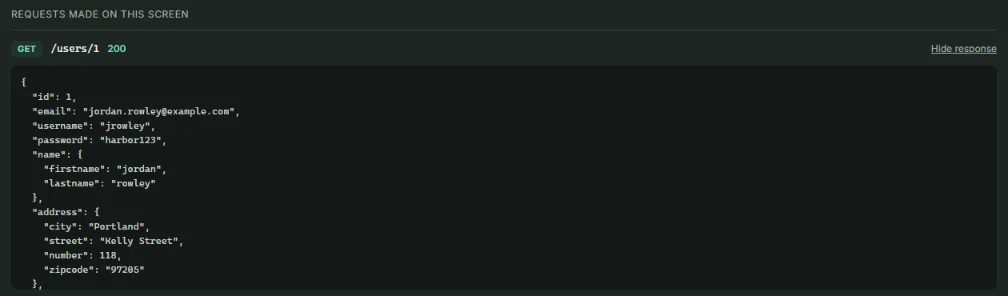
ExpectedA user response never includes a password, hashed or not.
ActualThe response includes a password field with the user's password in
plain text.
API inspectorWhat the store shows
Mitigation: The account screen reads only the fields it shows, and
requires sign-in. Verified by TC19 and TC23. The fix belongs in the API.
Storefront defects — 11, all fixed
Seven were found in the design mock, before the build; four in the prototype. Each
report says where it was found, what was expected, what happened, and how it was fixed and verified.
D-01 · [Account] Account details load without signing in
Found in: design review · design mock
Severity: HighPriority: HighFixed
Without signing in, open Account › Your account.
ExpectedThe store asks the shopper to sign in first.
ActualName, email, phone and address load for anyone. Checkout didn't ask either.
Fix: The account and checkout require sign-in, then return the shopper to
where they were going. Verified by TC15, TC18 and TC23.
D-02 · [Cart] Cart changes never reach the API
Found in: design review · design mock
Severity: HighPriority: HighFixed
Add a product, change a quantity, remove a line and clear the cart.
Check the requests the store made.
ExpectedEach change is sent to the API.
ActualChanges were saved only in the browser. The only request ever made was the first
GET, so the screen and the API disagreed.
Fix: Adding and changing send PUT, a new cart sends
POST, clearing sends DELETE. Verified by TC10, TC14, TC21 and TC22.
D-03 · [Cart] Opening the cart undoes the shopper's changes
Found in: reference verification · prototype, first build
Severity: HighPriority: HighFixed
Add a product from its page.
Open the cart.
ExpectedThe cart shows the product that was just added.
ActualThe first build read the cart again every time it opened. Against the real API —
which doesn't store writes — that read returns the original cart, and the change disappears.
Cause and fix: The prototype's local data stored every write, which hid
the problem; live requests while writing the reference exposed it. The local data now answers the way the
API does, and the store reads the cart once. Verified by TC12. A stand-in that's kinder than the real system
hides real defects.
D-04 · [Sign in] Empty fields get “That username and password don't match”
Found in: design review · design mock
Severity: MediumPriority: MediumFixed
Leave both fields empty and select Sign in.
ExpectedA message next to each empty field.
ActualThe wrong-password message, though nothing was checked.
Fixed
Fix: Field-level messages, aria-invalid, focus on the first
empty field, and no request sent. Verified by TC16.
D-05 · [API inspector] Response times are invented
Found in: design review · design mock
Severity: MediumPriority: MediumFixed
ExpectedEvery number in the inspector comes from a real request.
ActualFixed times like “88 ms” and “132 ms” were written into the design — nothing
measured them.
Fix: Times removed. The inspector shows only what happened: method,
endpoint, status and response.
D-06 · [Accessibility] Controls smaller than the 44 × 44 px the brief asked for
Found in: accessibility audit · design mock
Severity: MediumPriority: MediumFixed
ExpectedEvery control at least 44 × 44 px — the brief required it in writing.
ActualCategory chips and the Sort and Show menus were 40 px tall, the cart steppers 36
× 36 px, and the API calls button 36 px.
Fix: Every control resized to 44 px or more. Full numbers in the accessibility audit; verified by TC26, which measures them.
D-07 · [Accessibility] The account menu is announced as a menu but can't be used as one
Found in: accessibility audit · design mock
Severity: MediumPriority: LowFixed
ExpectedA control that behaves the way screen readers announce it.
Actualrole="menu" promises arrow-key navigation that wasn't there, and
Esc didn't close it.
Fix: A disclosure button with a plain list of links; Esc closes it and
returns focus. Verified by TC20.
D-08 · [Catalog] No page heading, and the Sort and Show labels are hidden
Found in: design review · design mock
Severity: LowPriority: MediumFixed
ExpectedA page heading that says where you are, and visible labels on every control.
ActualThe page opened on “Latest 5”; the menus relied on their options to explain
themselves.
Fix: “All products” or the category name as the page heading; visible Sort
and Show labels. Verified by TC01 and TC05.
D-09 · [Cart] At quantity 1, keyboard focus falls off the stepper
Found in: code review · prototype, before the first test run
Severity: MediumPriority: MediumFixed
In the cart, lower a quantity to 1 with the keyboard.
ExpectedFocus stays on the line being changed.
Actual“−” becomes disabled while it has focus, and focus jumps to the first product in
the list.
Fix: Focus moves to “+” on the same line. Verified by TC13.
D-10 · [Mobile] The first “Latest 5” card touches the edge of the screen
Found in: screenshot review at 400 px · prototype
Severity: LowPriority: LowFixed
ExpectedThe swipeable shelf starts at the same 16 px margin as the rest of the page.
ActualScroll snapping aligned the first card to the very edge of the screen.
Fix: Scroll padding that matches the page margin. Verified in the 400 px
screenshots above.
D-11 · [API inspector] A long response can't be scrolled with the keyboard
Found in: accessibility audit · prototype · axe-core, scrollable-region-focusable
Severity: MediumPriority: MediumFixed
Open Show API calls on the catalog.
Select Show response on the products request.
ExpectedA keyboard user can reach and scroll the response.
ActualThe response box scrolls with a mouse only. It appeared once product responses
gained their image field and grew past the box's height.
Fix: The response box takes keyboard focus and is labeled with its
request. A re-scan reports zero violations.
Accessibility audit
Contrast, measured
The mock's colors already met AA — measured with the WCAG 2.1 formula, not assumed. Every color added for
the prototype was measured the same way.
Element
Mock
Prototype
Text on the teal buttons
8.26:1
8.26:1
Secondary text
5.74:1
5.74:1
Search placeholder
4.56:1
4.87:1
Error messages
8.53:1
8.53:1
API inspector labels
6.15:1
7.01:1
API inspector error status
5.98:1
7.20:1
Target size
Control
Mock
Prototype
Category chips
40 px tall
44 px
Sort and Show menus
40 px tall
44 px
Cart quantity steppers
36 × 36 px
44 × 44 px
Show API calls
36 px tall
44 px
Automated scan (axe-core)
The first scan of the finished prototype found one violation (D-11). After the fix, zero violations in all
11 states scanned: catalog with the inspector open, empty search, unknown category, product, product not
found, cart, the clear-cart dialog, sign in with field errors, sign in after a 401, account with the menu
open, and the order summary. This case study page also scans clean.
Keyboard and focus
Every action is a native button, link, input or select, with a visible focus ring.
Sign-in errors move focus to the first empty field or to the alert (TC16, TC17).
The clear-cart dialog is a native modal: focus stays inside, and Esc closes it.
Changing a quantity never drops focus, even when a button becomes disabled (TC13).
Toasts and result counts are announced to screen readers through live regions.
Test cases — 26 run, 26 passed
26
Test cases executed against the prototype
26
Passed
11
Screen states scanned with axe-core
0
axe-core violations
Catalog and API inspector 8 cases
ID
Test
Technique
Expected result
Result
TC01
Catalog on load
Positive
“All products”, a Latest 5 shelf, and 10 of 20 products, newest first
Pass
TC02
Requests the catalog makes
Contract
Cart, categories, products and the shelf request — the shelf flagged BUG009
Pass
TC03
Open a defect flag
Usability
The BUG009 chip expands its explanation
Pass
TC04
Sort “Oldest first” with Show “All”
Parameter interaction
Products 1–20 in order, with no new request
Pass
TC05
Choose a category
Equivalence partitioning
Electronics: 6 products, no shelf, chip marked current
Pass
TC06
Open an unknown category link
Negative
“We don't recognize that category.” and no products request
Pass
TC07
Search
Equivalence partitioning
“skirt” → 2 results and no shelf; “zzz” → an empty state; clearing restores all
Pass
TC24
Open the BUG009 link
Usability
The inspector opens with the explanation expanded
Pass
Product page 4 cases
ID
Test
Technique
Expected result
Result
TC08
Open a product
Positive
Title, $289.99, “4.5 out of 5, 87 reviews” for screen readers, and a page title
Pass
TC09
Quantity stepper
Boundary values
Starts at 1 with “−” disabled; “+” raises it
Pass
TC10
Add to cart
State transition
“Adding…”, badge 3 → 5, a confirmation, and a PUT
Pass
TC11
Open a product that doesn't exist
Boundary values
“We can't find that product.”; the inspector shows 200 and BUG008
Pass
Cart 5 cases
ID
Test
Technique
Expected result
Result
TC12
Open the cart after adding
State transition
Both lines and a $934.97 subtotal, with no second read of the cart
Pass
TC13
Lower a quantity to 1
Boundary values
Totals and badge update; at 1, “−” disables and focus moves to “+”
Pass
TC14
Remove a line
State transition
The line goes, “Item removed” appears in the status message, and the badge updates
Pass
TC21
Clear the cart
Negative
Cancel keeps everything; confirming sends DELETE and shows the empty cart
Pass
TC22
Add after clearing
State transition
A new cart is created with POST (201)
Pass
Sign in and account 7 cases
ID
Test
Technique
Expected result
Result
TC15
Checkout while signed out
Role-based
Goes to sign in and keeps the destination
Pass
TC16
Submit an empty form
Negative
Two field errors, focus on Username, no request
Pass
TC17
Wrong password
Negative
401; the alert takes focus; the button is usable again
Pass
TC18
Show password, then sign in
Positive
The toggle works; sign-in returns to the order summary
Pass
TC19
Account screen
Security
Profile shown from GET /users/1; the response has a password; the screen never shows
it
Pass
TC20
Account menu with the keyboard
Accessibility
Opens, closes with Esc, and returns focus to the button
Pass
TC23
Sign out
Role-based
The header shows “Sign in”; Account goes to sign in
Pass
Offline and target size 2 cases
ID
Test
Technique
Expected result
Result
TC25
Lose the connection on the catalog
Negative
“We can't load products right now.” with Try again; it recovers once back online
Pass
TC26
Measure every control
Accessibility
Every control on catalog, product, cart and sign in is at least 44 × 44 px
Pass
Traceability
Every requirement maps to the tests that check it and the defects behind it — the API's and the store's.
Requirement
Tests
Defects
Status
A missing product never shows a blank page
TC11
BUG008
Met with workaround
“Newest first” really shows the newest products
TC01, TC04
BUG009
Met with workaround
Cart changes reach the API and survive moving around the store
TC10, TC12, TC14, TC21, TC22
D-02, D-03
Fixed
Account and checkout require sign-in; the password is never shown
TC15, TC18, TC19, TC23
D-01, security observation
Fixed · mitigated
Every error says what happened and what to do
TC06, TC16, TC17, TC25
D-04
Fixed
Every number on screen is true
TC01, TC12
D-05
Fixed
WCAG AA, keyboard-operable, 44 px targets
Contrast audit, axe-core, TC13, TC20, TC26
D-06, D-07, D-08, D-09, D-11
Fixed
Works at 400 px
Screenshot review
D-10
Fixed
The reference matches the API's real behavior
Reference verification
BUG010
Documented
Decision log
1
Test the API before designing on it
The test results became the design brief. Designing first would have meant discovering BUG008 and
BUG009 as broken screens instead of as requirements.
2
Verify the documentation against the real thing
Sending every documented request live found BUG010, corrected the sign-in status from 200 to 201, and
showed that writes aren't stored — which exposed D-03.
3
Make the stand-in behave like the API, not like an ideal API
The prototype's local data first stored every write, which hid D-03. It now answers exactly the way
the API does, flaws included.
4
Spend the most time on data a shopper can't check
Wrong products, lost carts and exposed data are the three High risks. They got 13 of the 26 cases.
5
When a test fails, check the test too
The first run failed 4 cases. All four were wrong totals in the test script, not in the store — the
expected values had missed a product added earlier in the run. The expectations were corrected and the
suite re-run.
6
What wasn't tested — and what's next
A manual screen-reader pass: names, roles and live regions are covered by axe-core and the tests, not
by listening. Firefox and Safari. The store against the live API — it runs on local data checked
against live responses. Next: run the Postman collection automatically with Newman on every change.